
If your WordPress website is publishing high-quality content consistently but still struggling to rank higher in search results, there is a strong chance that Core Web Vitals are part of the problem. In recent years, Google has shifted heavily toward user experience signals, and in 2026 these performance metrics are more important than ever for SEO, rankings, engagement, and long-term website growth.
Many website owners focus only on keywords, backlinks, and content while ignoring how their website actually performs for real users. However, modern SEO is no longer just about publishing articles. Search engines now evaluate how fast your website loads, how stable the layout feels during loading, and how responsive the site reacts when users interact with buttons, menus, or forms.
This is exactly where Core Web Vitals become extremely important.
Core Web Vitals are a set of performance measurements introduced by Google to evaluate real-world user experience on websites. These metrics measure loading speed, visual stability, and responsiveness. A website with poor Core Web Vitals may experience lower rankings, weaker engagement, higher bounce rates, and reduced conversions even if the content itself is excellent.
The good news is that improving Core Web Vitals in WordPress is absolutely possible, even for beginners, and you do not necessarily need advanced coding knowledge to achieve noticeable improvements.
In this complete guide, you will learn:
- what Core Web Vitals are
- why they matter for SEO
- how to improve LCP, CLS, and INP
- proven optimization techniques that actually work
- common mistakes to avoid
- practical WordPress optimization strategies for 2026
What Are Core Web Vitals?
Core Web Vitals are performance metrics created by Google to measure real user experience on websites. Instead of simply checking whether a page exists or whether content is readable, these metrics focus on how users actually experience your website while browsing.
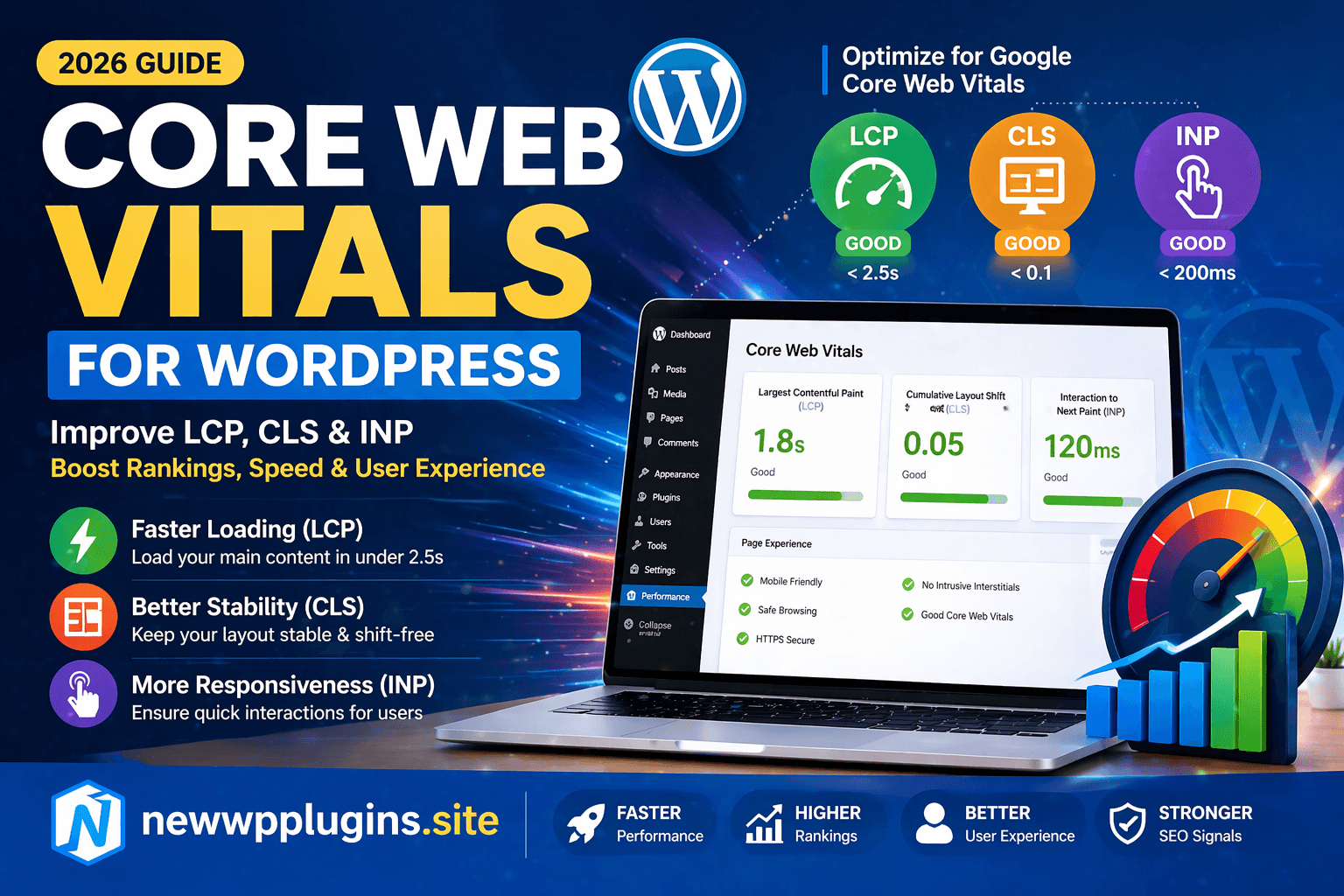
The three primary metrics are:
- LCP (Largest Contentful Paint)
- CLS (Cumulative Layout Shift)
- INP (Interaction to Next Paint)
Each metric measures a different part of the browsing experience.
LCP focuses on loading performance, CLS measures layout stability, and INP evaluates responsiveness during interaction. Together, these metrics help search engines understand whether your website feels fast, smooth, and user-friendly.
Why Core Web Vitals Matter for SEO
Google introduced Core Web Vitals as part of its Page Experience system because user experience directly affects how visitors interact with websites. A slow or unstable website frustrates users, increases bounce rates, and reduces engagement, which ultimately creates a weaker browsing experience.
Websites with strong Core Web Vitals often benefit from:
- better search rankings
- improved mobile usability
- lower bounce rates
- higher engagement
- stronger conversions
- improved user satisfaction
This is especially important for:
- blogs
- affiliate websites
- WooCommerce stores
- tutorial websites
- SaaS landing pages
- business websites
In competitive niches, even small performance improvements can make a noticeable difference.
Understanding Largest Contentful Paint (LCP)
LCP, or Largest Contentful Paint, measures how long it takes for the main visible content on a page to load. Usually, this includes large images, hero banners, featured images, or prominent headings above the fold.
In simple terms, LCP measures how quickly visitors can actually see the important content on your website.
According to Google:
- Good LCP = under 2.5 seconds
- Needs improvement = 2.5 to 4 seconds
- Poor = over 4 seconds
If your website loads slowly, users may leave before they even begin reading.
This is one of the biggest reasons why slow websites struggle with:
- rankings
- engagement
- conversions
- mobile performance
Why LCP Becomes Slow
Several common WordPress issues can increase LCP significantly. Large unoptimized images are one of the biggest causes because oversized images take longer to download and render. Cheap hosting can also delay server response times, while excessive CSS and JavaScript files may block rendering completely.
Heavy themes, page builders, and multiple plugins often make the situation even worse. Fortunately, most LCP issues can be improved with practical optimization strategies.
How to Improve LCP in WordPress
One of the most effective ways to improve LCP is by using faster hosting. Cheap shared hosting environments often struggle under traffic because resources are heavily limited. Better hosting alone can significantly improve loading times.
Caching also plays a major role. Plugins like LiteSpeed Cache or WP Rocket help generate faster static versions of pages, reducing server processing time dramatically.
Image optimization is equally important because large images are one of the biggest performance killers on WordPress websites. Compressing images, converting them to WEBP format, and avoiding oversized uploads can noticeably improve LCP scores.
Read: Best Image Optimization Plugins for WordPress (2026 Powerfull Guide)
Using a CDN such as Cloudflare can also improve delivery speed by serving files closer to visitors geographically. Another major improvement comes from reducing render-blocking resources. Excessive CSS and JavaScript delay page rendering and prevent important content from loading quickly.
Understanding Cumulative Layout Shift (CLS)
CLS, or Cumulative Layout Shift, measures visual stability while a page loads. This metric tracks how much page elements unexpectedly move during loading.
You have probably experienced this before:
you try clicking a button, but suddenly the layout shifts and you accidentally click something else. That is a poor CLS experience.
Google classifies CLS scores as:
- Good = below 0.1
- Needs improvement = 0.1 to 0.25
- Poor = above 0.25
Even if a website loads quickly, unstable layouts can still frustrate visitors heavily.
What Causes Poor CLS?
One of the biggest causes of layout shifting is images without fixed dimensions. If the browser does not know the image size beforehand, it cannot reserve proper space during loading.
Ads, popups, dynamic banners, and injected content can also push layouts around unexpectedly. Web fonts sometimes create shifting when fallback fonts suddenly switch to custom fonts during rendering.
These issues may appear small individually, but collectively they create a poor browsing experience.
How to Fix CLS in WordPress
A very important step is defining image dimensions properly. Always specify width and height for images so browsers reserve layout space before loading. Avoid dynamic advertisements that appear without reserved containers because these often create major layout jumps.
Using stable fonts or preloading important fonts can reduce font-related shifting significantly.
You should also avoid injecting new content above already loaded content because this pushes layouts downward unexpectedly. Most modern optimization plugins and themes now include tools to improve CLS automatically, but careful frontend design remains important.
Understanding Interaction to Next Paint (INP)
INP, or Interaction to Next Paint, measures how responsive your website feels when users interact with it. This metric replaced FID (First Input Delay) in recent Google updates and focuses on real interaction responsiveness.
When users:
- click buttons
- open menus
- type into forms
- interact with sliders
the website should respond quickly.
Google considers:
- under 200ms = good
- 200–500ms = needs improvement
- over 500ms = poor
A website may visually load quickly but still feel sluggish if interactions are delayed.
Why INP Matters More in 2026
Modern websites increasingly rely on JavaScript-heavy interfaces, animations, sliders, popups, and interactive elements. Unfortunately, excessive JavaScript often slows responsiveness dramatically.
Users expect instant feedback while browsing. If interactions feel delayed, visitors often become frustrated quickly. Improving INP helps create a smoother and more responsive browsing experience, especially on mobile devices.
How to Improve INP in WordPress
Reducing JavaScript execution time is one of the most effective ways to improve INP. Heavy scripts delay interaction responsiveness and increase processing overhead. Removing unused scripts and delaying non-critical JavaScript can significantly improve responsiveness.
Choosing lightweight themes instead of bloated multipurpose themes also helps considerably.
Too many plugins often create excessive frontend scripts and background processing. Keeping only essential plugins improves both speed and responsiveness. Browser caching also helps repeat visitors load resources more efficiently.
Read: LiteSpeed Cache Settings for WordPress (Fast Speed Guide)
How to Test Core Web Vitals
Several free tools help measure Core Web Vitals performance.
One of the most popular tools is:
Google PageSpeed Insights
This tool provides:
- LCP analysis
- CLS measurements
- INP scores
- optimization recommendations
You can also use:
These tools help identify performance bottlenecks affecting user experience.
WordPress Optimization Techniques That Actually Work
Many optimization tutorials become overly technical and confusing, but some practical improvements consistently produce noticeable results. Using proper caching is one of the biggest improvements possible for WordPress performance.
Image optimization also has enormous impact because media files often represent the majority of page weight. Lazy loading delays offscreen image loading and improves initial rendering speed significantly.
Database optimization helps reduce unnecessary overhead created by post revisions, transients, and plugin data accumulation. Enabling GZIP compression and using HTTP/3 hosting can further improve delivery performance.
Advanced Optimization Tips for Better Core Web Vitals
As websites grow, advanced optimization strategies may become increasingly important.
Using DNS prefetching can improve third-party resource loading efficiency. Optimizing databases regularly helps maintain cleaner backend performance. Reducing unused CSS and JavaScript improves rendering speed considerably, while preloading important assets helps prioritize visible content.
Modern performance optimization focuses heavily on reducing frontend complexity instead of simply adding more plugins.
Common Mistakes Website Owners Make
One major mistake is installing too many plugins. Every additional plugin increases the possibility of:
- extra scripts
- larger CSS files
- slower queries
- frontend conflicts
Another common mistake is ignoring mobile performance entirely even though mobile users now dominate web traffic globally.
Oversized images remain one of the biggest speed killers across WordPress websites. Many users upload images directly from phones or cameras without compression. Cheap hosting is another major issue because server response time affects every performance metric directly.
Finally, many beginners forget to implement caching systems at all, which dramatically reduces overall performance potential.
Internal resources
- On-Page SEO Checklist for WordPress (2026) Rank Faster
- Technical SEO for WordPress (2026 Guide)
- How to Speed Up WordPress Website 2026
- LiteSpeed Cache Settings for WordPress (Fast Speed Guide)
- How to Enable Maintenance Mode in WordPress (Complete Beginner’s Guide)
Final Optimization Checklist
Before considering your website fully optimized, verify:
- LCP under 2.5 seconds
- CLS below 0.1
- INP under 200ms
- optimized images
- caching enabled
- lazy loading active
- mobile performance tested
- unused plugins removed
Even small improvements across multiple areas can significantly improve overall Core Web Vitals performance.
Final Thoughts
Core Web Vitals are no longer optional for modern WordPress websites. In 2026, performance directly affects SEO, user experience, engagement, and long-term growth.
Improving LCP, CLS, and INP helps create websites that feel:
- faster
- smoother
- more stable
- more responsive
instead of slow or frustrating.
The most effective optimization strategy is usually not the most complicated one. Lightweight themes, optimized images, proper caching, reduced scripts, and better hosting often produce the biggest results.
By gradually improving Core Web Vitals, your WordPress website becomes more competitive not only for search rankings but also for real users who expect fast and professional browsing experiences.