

Protect your WordPress website from brute-force attacks, suspicious login attempts, spam bots, and unauthorized access using a lightweight and beginner-friendly security solution built specifically for WordPress websites.
Download Plugin Versions
AI Safe Login Guard PLUGIN – Version 1.0
The original lightweight release focused on:
- login attempt limiting,
- brute-force protection,
- temporary IP lockouts,
- and simple login security.
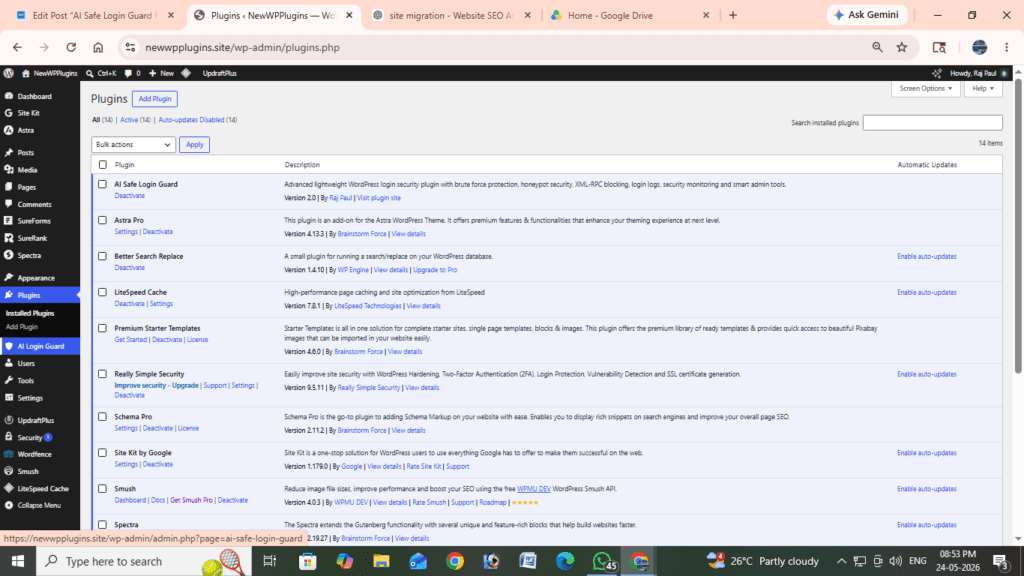
AI Safe Login Guard PLUGIN – Version 2.0
The upgraded release with advanced dashboard features, login monitoring, XML-RPC protection, honeypot security, and improved admin controls.
MY PERSONAL RECOMMENDATION IS VERSION 2.0
Advanced Login Security for Modern WordPress Websites
WordPress powers millions of websites worldwide, making it one of the biggest targets for automated login attacks, brute-force attempts, credential stuffing, bot abuse, and suspicious authentication activity.
Weak login protection can expose websites to:
- repeated brute-force attacks,
- password guessing attempts,
- automated login spam,
- admin account compromise,
- server abuse,
- and suspicious bot traffic.
AI Safe Login Guard was created to help WordPress website owners improve login security using a lightweight, easy-to-use, and performance-friendly security system without relying on heavy firewall plugins or complicated server configurations.
The plugin focuses on:
- login page protection,
- brute-force prevention,
- suspicious login monitoring,
- bot reduction,
- XML-RPC protection,
- and smart login security tools.
Whether you run:
- a blog,
- business website,
- WooCommerce store,
- membership platform,
- portfolio website,
- or content-driven WordPress site,
AI Safe Login Guard helps secure your WordPress login area while remaining lightweight and beginner friendly.
The Journey of AI Safe Login Guard
AI Safe Login Guard started as a simple lightweight WordPress login protection plugin focused mainly on limiting repeated failed login attempts.
The original Version 1.0 included:
- basic brute-force protection,
- login attempt limiting,
- temporary IP blocking,
- admin-configurable settings,
- and email alerts.
The goal of the first version was simplicity:
provide essential login security for WordPress websites without slowing down performance.
As the plugin evolved, new security improvements and dashboard features were introduced to create a more complete lightweight security experience for WordPress users.
This led to:
AI Safe Login Guard Version 2.0
which introduced:
- advanced security dashboard,
- login activity logs,
- XML-RPC protection,
- honeypot anti-bot security,
- security statistics,
- improved monitoring,
- custom lockout messages,
- and enhanced admin controls.
The plugin now provides multiple layers of login protection while remaining lightweight and easy to manage.
Why WordPress Login Security Matters
The WordPress login page is one of the most attacked areas of a website.
Attackers commonly attempt:
- automated password guessing,
- admin username attacks,
- credential stuffing,
- XML-RPC abuse,
- bot-driven login spam,
- and repeated login attempts from malicious IP addresses.
Without proper login protection:
- admin accounts may become vulnerable,
- websites may experience increased server load,
- suspicious traffic can grow,
- and security risks increase significantly.
AI Safe Login Guard helps reduce these risks using multiple lightweight security layers designed specifically for WordPress login protection.
Plugin Screenshots V1.0
Security Dashboard
Login statistics and plugin security overview.
Plugin Settings
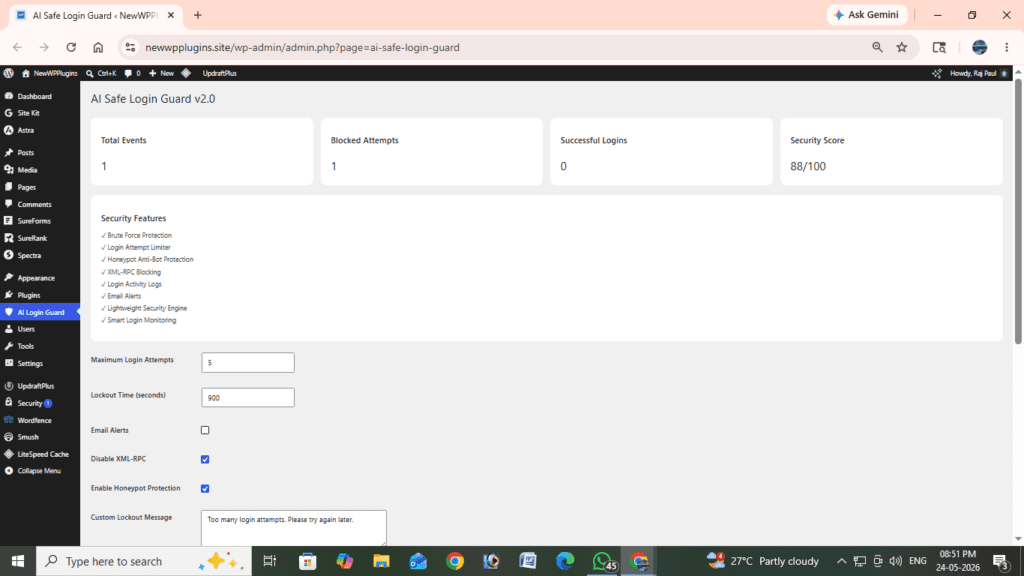
Login attempt limits, XML-RPC settings, and security controls.
Login Block Notification
Temporary lockout message after repeated failed attempts.
Core Features
Brute Force Protection
AI Safe Login Guard helps prevent repeated failed login attempts by temporarily blocking suspicious IP addresses after multiple login failures.
This helps reduce:
- automated password attacks,
- brute-force login attempts,
- and repeated unauthorized access attempts.
Login Attempt Limiter
Administrators can configure:
- maximum login attempts,
- lockout duration,
- and login security behavior.
This allows website owners to customize protection levels based on their security needs.
Honeypot Anti-Bot Security
Version 2.0 introduced lightweight honeypot protection designed to trap automated login bots silently in the background.
Benefits include:
- reduced automated login spam,
- improved bot filtering,
- and better user experience without CAPTCHA systems.
XML-RPC Protection
XML-RPC attacks are commonly used in WordPress brute-force campaigns.
AI Safe Login Guard includes XML-RPC protection to help reduce:
- suspicious XML-RPC requests,
- pingback abuse,
- and automated authentication attacks.
This feature became one of the major security improvements introduced in Version 2.0.
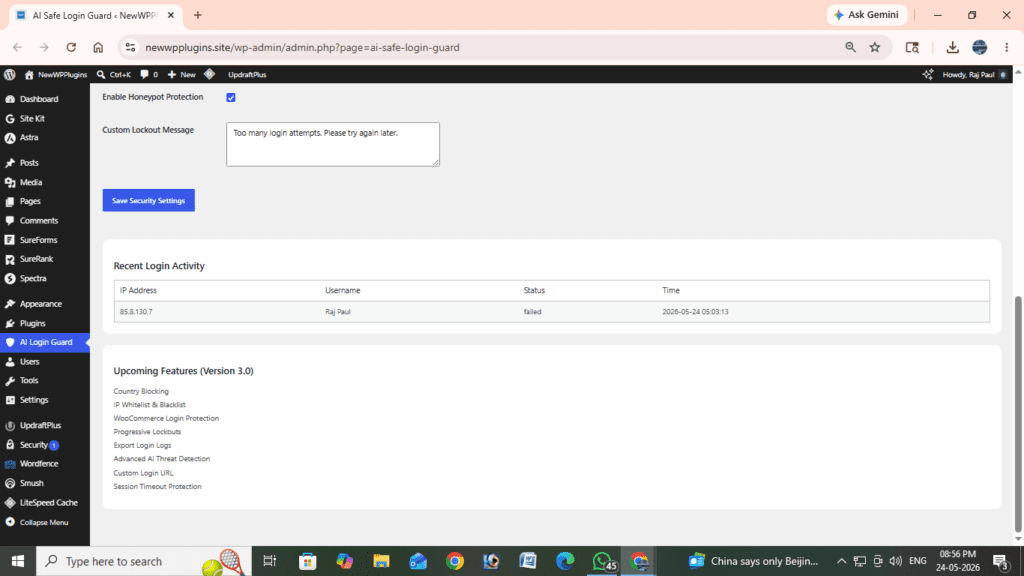
Login Activity Logs
Version 2.0 introduced login activity monitoring directly inside the dashboard.
Track:
- successful logins,
- failed login attempts,
- blocked requests,
- usernames,
- IP addresses,
- and timestamps.
This allows administrators to monitor suspicious login activity more effectively.
Email Security Alerts
Receive email notifications when suspicious login activity or blocked login attempts are detected.
This helps website owners react more quickly to possible threats.
Security Dashboard
One of the biggest improvements introduced in Version 2.0 is the advanced security dashboard.
The dashboard includes:
- login statistics,
- blocked attempt counters,
- security overview cards,
- login monitoring,
- and simplified security controls.
The interface was redesigned to remain:
- beginner friendly,
- lightweight,
- and easy to navigate.
Lightweight Performance
Many WordPress security plugins become resource heavy due to:
- large firewall engines,
- cloud scanning systems,
- excessive database usage,
- and external API requests.
AI Safe Login Guard focuses on:
- lightweight performance,
- minimal server impact,
- and simple security management.
This makes it suitable for:
- shared hosting,
- VPS hosting,
- blogs,
- and performance-focused WordPress websites.
Plugin Information
| Feature | Details |
|---|---|
| Plugin Name | AI Safe Login Guard |
| Current Version | 2.0 |
| First Release | Version 1.0 |
| Upcoming Version | Version 3.0 |
| Plugin Type | WordPress Security Plugin |
| WordPress Compatibility | WordPress 6.x |
| PHP Support | PHP 7.4+ |
| XML-RPC Protection | Yes |
| Honeypot Protection | Yes |
| Login Logs | Yes |
| Security Dashboard | Yes |
| Lightweight | Yes |
| External API Required | No |
| License | Proprietary |
| Usage | Free for personal & commercial use |
Installation
- Download the plugin ZIP file
- Open your WordPress dashboard
- Navigate to Plugins → Add New
- Click Upload Plugin
- Upload the plugin ZIP file
- Click Install Now
- Activate the plugin
- Open AI Login Guard V.0 from the dashboard menu
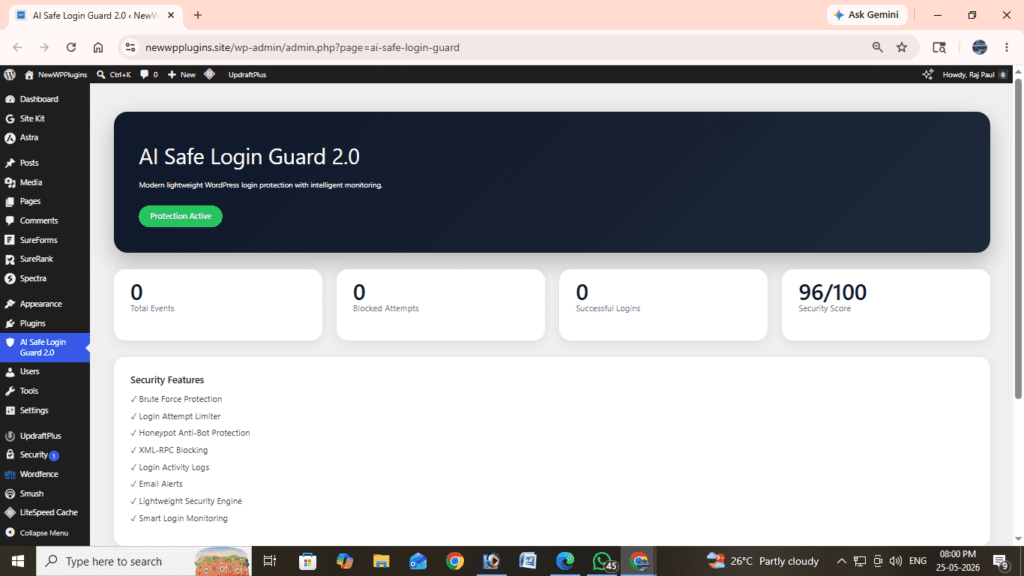
After activation, the plugin automatically begins protecting your WordPress login page.
Dashboard Features
The plugin dashboard allows administrators to:
- Configure maximum login attempts
- Set lockout duration
- Enable or disable XML-RPC protection
- Enable honeypot anti-bot protection
- Enable email notifications
- Customize login lockout messages
- Monitor login activity logs
- View security statistics
- Track blocked login attempts
Version 2.0 significantly improved dashboard functionality and monitoring features compared to the original release.
Improvements Introduced in Version 2.0
The updated Version 2.0 includes major improvements over the original Version 1.0.
New Features Added
- Advanced security dashboard
- Login statistics cards
- Honeypot anti-bot protection
- XML-RPC blocking
- Login activity logs
- Improved admin controls
- Better monitoring system
- Enhanced UI design
- Security overview panels
- Improved lightweight architecture
These improvements help make AI Safe Login Guard feel more like a complete lightweight WordPress login security solution.
Upcoming Features in Version 3.0
Future updates planned for Version 3.0 include:
- Country blocking
- IP whitelist & blacklist
- WooCommerce login protection
- Progressive lockout system
- Exportable login logs
- Session timeout protection
- Advanced AI threat detection
- Custom login URL support
- Smart suspicious IP detection
- Improved login analytics
Version 3.0 aims to further improve login security while maintaining lightweight performance and beginner-friendly usability.
Why Use AI Safe Login Guard?
AI Safe Login Guard focuses on:
- simplicity,
- lightweight performance,
- essential login security,
- and clean dashboard usability.
Benefits include:
- Better WordPress login protection
- Reduced brute-force attacks
- Improved admin security
- Cleaner login monitoring
- Lightweight performance
- Easy configuration
- Beginner-friendly controls
- Reduced suspicious login activity
The plugin is especially useful for users who want:
- essential security protection,
- lightweight performance,
- and simple WordPress login management.
Frequently Asked Questions
Is AI Safe Login Guard free?
Yes. The plugin is free for personal and commercial use.
Does the plugin slow down WordPress?
No. AI Safe Login Guard is optimized for lightweight performance.
Does the plugin require external APIs?
No. The plugin works locally without relying heavily on external services.
Can I customize security settings?
Yes. Administrators can configure:
- login attempts,
- lockout duration,
- email alerts,
- honeypot protection,
- and XML-RPC security settings.
Does the plugin block bots automatically?
Yes. The honeypot anti-bot system helps reduce automated login attacks.
Is XML-RPC disabled automatically?
Yes, when XML-RPC protection is enabled in plugin settings.
Recommended Related Articles
- AI Smart Comment Shield Plugin
- Best WordPress Security Plugins
- How to Protect WordPress Login from Brute Force Attacks
- WordPress Security Best Practices
- Core Web Vitals Optimization Guide
Final Thoughts
AI Safe Login Guard started as a lightweight login protection plugin focused on brute-force prevention and has evolved into a more advanced WordPress login security solution with monitoring, XML-RPC protection, honeypot security, and dashboard-based login analytics.
Version 2.0 introduced major improvements that expanded the plugin beyond simple login limiting into a cleaner and more complete lightweight security experience for WordPress users.
With Version 3.0 already planned, AI Safe Login Guard continues to evolve while maintaining its core philosophy: lightweight, beginner-friendly, and performance-focused WordPress login security.
Download Plugin tODAY!
Advanced upgraded release with monitoring dashboard and improved security tools.
Hello to all, the contents present at this web site are really remarkable for people experience, well, keep up the good work fellows.
Hi there! Do you know if they make any plugins to protect against hackers? I’m kinda paranoid about losing everything I’ve worked hard on. Any tips?